
Visual Production Scheduling Software

Real-Time Graphical Production Scheduling for the Manufacturing Floor

Production Scheduling

Why Spreadsheets Fail for Production Scheduling

Planning production with spreadsheets creates a schedule that is already stale the moment it is printed. A planner may know the promised ship date, routing, and current workload at the start of the day, but that picture changes as soon as a rush order arrives, a machine goes down, material is delayed, or an operator is pulled to a different work center.

For high-mix, low-volume, make-to-order, and engineer-to-order manufacturers, those changes are constant. A single job can compete for shared machines, specialized labor, tooling, outside processing, and scarce materials. When each constraint is tracked in a separate spreadsheet or ERP screen, the planner spends more time reconciling data than improving the schedule.

The Real Cost of Outdated Scheduling

The cost shows up as missed delivery dates, excess work in process, overtime, expediting fees, and frustrated customers. Supervisors walk the floor asking what is really happening. Purchasing cannot see which shortages threaten the plan. Customer service cannot give confident answers because the schedule does not reflect actual shop capacity.

JobPack replaces spreadsheet scheduling with a real-time production plan that connects planning, job packets, shop-floor activity, capacity, and performance data. Instead of rebuilding the schedule manually after every disruption, planners can see the impact, adjust priorities, and communicate the new plan quickly.

Manufacturers balancing high-mix work, changing due dates, and shared resources can also explore JobPack’s production scheduling software for Chicago manufacturers for a regional scheduling workflow built around discrete production constraints.

Need support pitching JobPack® to management?

We’ve got you covered.
Production Scheduling

What Is Visual Production Scheduling Software?

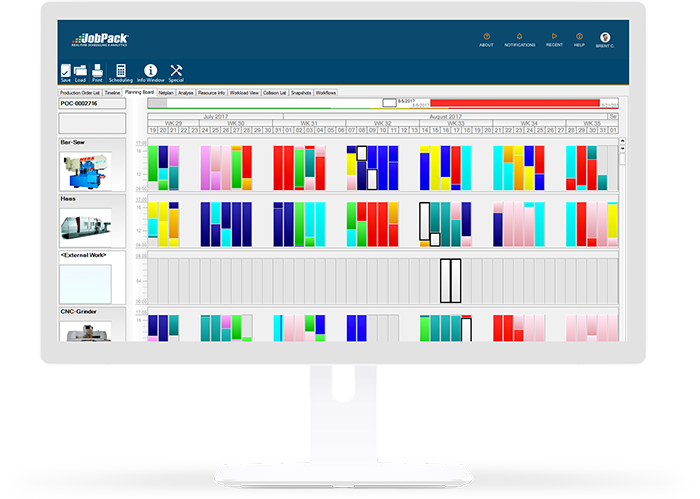
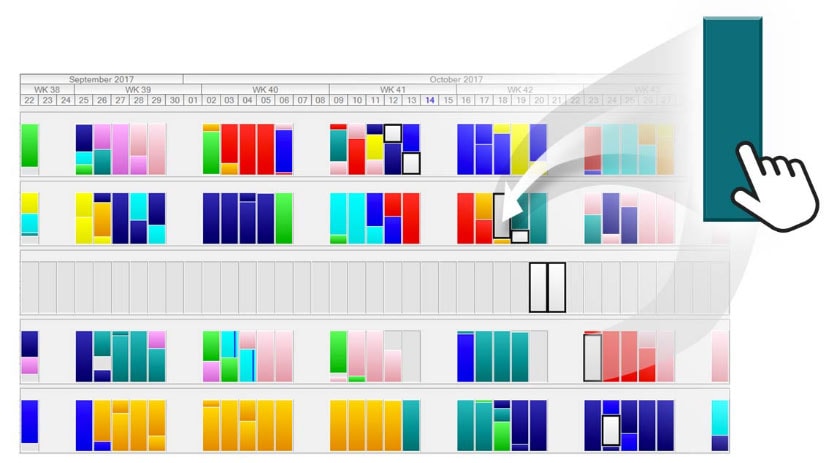
Visual production scheduling software gives manufacturers a drag-and-drop planning board for sequencing jobs against real constraints. It turns routings, due dates, operation times, resource availability, and live shop-floor status into a schedule that planners can see and adjust.

Unlike basic ERP scheduling, which often assumes infinite capacity or relies on static lead times, JobPack helps planners understand what can realistically be produced with the machines, labor, materials, and subcontract capacity available today. The result is a production schedule that is easier to trust, easier to explain, and easier to update when conditions change.

Request a Demo to see how JobPack turns disconnected planning data into a visual production schedule.

Core Features of JobPack Production Scheduling

Drag-and-Drop Planning Board

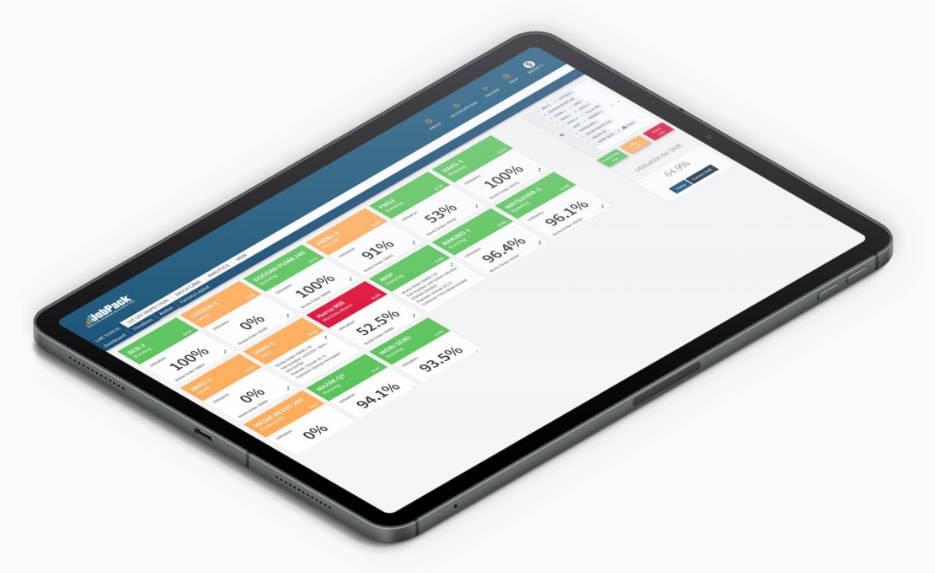
The JobPack Planning Board gives planners a live view of jobs, operations, dates, and resource loading. Teams can move jobs, resequence operations, and see schedule impact without rebuilding the plan from scratch.

For planners, the value is speed and confidence. A visual schedule makes conflicts obvious: two priority jobs competing for the same machine, a promised delivery date that requires impossible throughput, or a downstream operation waiting on material that has not arrived. Teams can move from reactive expediting to controlled planning because the schedule reflects the way work actually flows through the plant.

Request a Demo
Plant & Operations Managers

Plant & Operations Managers

Improve Shop Floor Throughput.

Request a Demo
Production Scheduling

What-If Scenario Planning

The Planning Board lets you test schedule changes before committing them to the live production plan. Planners can model the impact of a rush order, a delayed material delivery, a machine outage, or overtime before the change reaches the shop floor.

This is especially valuable for job shops and discrete manufacturers where every order has different routings and priorities. Instead of promising a ship date based on instinct, planners can compare scenarios and choose the plan that protects on-time delivery and capacity utilization.

Request a Demo to review a what-if scheduling workflow using your production environment as the model.

Finite Capacity Scheduling

JobPack helps manufacturers plan against realistic capacity. Planners can account for machine availability, operation overlap rules, setup time, subcontract constraints, labor availability, and workload by work center. Capacity windows make it easier to spot overloads before they become missed shipments.

Finite capacity planning also helps protect margin. When a schedule is built on optimistic assumptions, the plant absorbs the difference through overtime, premium freight, excess WIP, and constant firefighting. By seeing constraints before work is released, manufacturers can make better tradeoffs: split a job, move work to another resource, adjust sequence, or renegotiate a delivery promise before it becomes a customer problem.

Request a Demo
Production Scheduling

Digital Job Packets

Paper job packs create version-control problems. Every engineering change, routing update, inspection note, or schedule adjustment requires reprinting and redistributing documents across the shop. JobPack keeps production data in digital job packets that stay current as the plan changes.

Digital job packets help operators work from the latest instructions, give supervisors better visibility into job status, and preserve an audit trail for completed work. They also reduce paper, toner, storage, and administrative time.

Automated Bottleneck Alerts

Delays often begin quietly: an outside process is only available three days per week, a changeover takes longer than expected, or a shared resource is double-booked. JobPack surfaces bottlenecks earlier so planners can adjust priorities, communicate risks, and set realistic delivery dates.

Bottleneck alerts are most useful when they connect planning with execution. A planner does not just need to know that a job is late; they need to know which operation, material, supplier, or resource is creating the risk. JobPack helps teams focus attention where it can still change the outcome.

Production Scheduling

How JobPack Compares: Spreadsheets vs. ERP vs. MES

Approach Best Use Scheduling Limitation JobPack Advantage
Spreadsheets Small, simple job lists Manual updates, weak constraint visibility, no live shop-floor feedback Real-time planning board with connected job, capacity, and status data
ERP scheduling Orders, inventory, financial records Often uses static lead times or infinite capacity assumptions Finite capacity planning built for shop-floor execution
Standalone MES Execution tracking and production data capture May not provide advanced planning and what-if scheduling MES and APS capabilities connected in one production workflow
JobPack High-mix discrete manufacturing Designed for complex routings, constraints, and changing priorities Visual scheduling, digital job packets, alerts, and analytics in one platform

JobPack is not a replacement for every ERP function. It fills the scheduling gap where ERP planning falls short by connecting production control to real shop-floor capacity. Manufacturers can also pair scheduling with machine monitoring and data analytics for a more complete view of performance.

The comparison matters because most manufacturers already have some form of ERP, spreadsheets, and shop-floor tracking. The problem is not a complete lack of systems; it is that those systems often do not produce a single, realistic, visual schedule. JobPack is designed to sit in that operational gap, where planners need to translate demand, capacity, and execution data into a plan the shop can follow.

Production Scheduling

Measurable Benefits for Job Shops and Discrete Manufacturers

When manufacturers plan from actual capacity, material status, and delivery requirements, they can:

  • Improve on-time delivery by up to 17% by identifying schedule risk earlier.
  • Reduce lead times by removing avoidable queues, overloads, and communication delays.
  • Improve machine efficiency by sequencing similar work and reducing unnecessary changeovers.
  • Cut manufacturing costs by minimizing excess inventory, overtime, and expediting.
  • Give customer service more reliable delivery estimates based on current capacity.
  • Provide managers with a shared view of production priorities, constraints, and expected completion dates.

Request a Demo to see how these scheduling improvements apply to your shop.

These improvements compound over time. Better schedules reduce the number of jobs sitting idle between operations. Fewer surprises improve purchasing decisions and supplier communication. More reliable completion dates reduce customer service escalations. Most importantly, planners gain time back because they are no longer manually reconciling several versions of the truth before every production meeting.

Request a Demo
Software Comparison Guide: Get to Know Your Options

How JobPack Compares With Other Production Scheduling Software

Get the guide
Software Comparison Guide: Get to Know Your Options

Software Comparison Guide: Get to Know Your Options

JobPack® has been specializing in digital solutions since 1992, so we understand the importance of connecting the right data with the right people to make informed decisions.

Get the guide
Production Scheduling

More Informed Decision-Making for Owners and the C-Suite

Production scheduling methods that rely on paper and spreadsheets insulate the back office from real shop-floor conditions. Owners and executives need to know whether the business can accept a rush order, justify a new machine, add a shift, or commit to a strategic customer without damaging the rest of the schedule.

JobPack combines production scheduling with machine utilization, job progress, and performance data. That gives leaders a better foundation for capacity investment, staffing, customer commitments, and continuous improvement decisions.

For leadership teams, this visibility changes the quality of management reviews. Instead of debating whose spreadsheet is right, teams can discuss the constraint that is limiting throughput and the investment or process change needed to remove it. That makes scheduling data useful beyond dispatching; it becomes a management tool for growth.

Production Scheduling

Improved Communication Between Managers and the Shop Floor

A schedule only works if everyone understands the latest priority. JobPack gives planners, supervisors, and operators a connected source of truth for what should run next, which jobs are at risk, and why priorities changed.

When the production plan is visible, supervisors spend less time chasing updates and more time removing constraints. Operators can work from current job packets. Customer-facing teams can communicate realistic delivery dates because they are not relying on yesterday’s spreadsheet.

Production Scheduling Software FAQ

What is production scheduling software?

Production scheduling software helps manufacturers sequence jobs, allocate resources, and manage delivery dates against machine, labor, material, and routing constraints.

How is JobPack different from ERP scheduling?

ERP systems manage orders, inventory, and financial data, but many do not provide the visual, finite-capacity planning needed for complex shop-floor scheduling. JobPack focuses on the production execution gap.

Can JobPack help with high-mix manufacturing?

Yes. JobPack is designed for environments where jobs have different routings, priorities, resources, and changeover requirements.

Does JobPack support real-time production visibility?

Yes. JobPack can connect scheduling with production status, digital job packets, machine monitoring, and analytics so teams can respond quickly as conditions change.

FAQ pages also support answer-engine optimization by making direct, concise answers available for searchers comparing ERP scheduling, MES, APS, and manufacturing planning tools. The questions below address common buying concerns for production planners and operations leaders evaluating JobPack.

Production Scheduling

Ready to See JobPack in Action?

If spreadsheets, whiteboards, or ERP scheduling are limiting your ability to plan production, JobPack gives your team a more reliable way to control capacity, delivery dates, and shop-floor execution.

See how JobPack’s production scheduling software can help your team improve on-time delivery, reduce lead times, and respond faster to disruption.

Request a Demo and review a visual production scheduling workflow with a JobPack specialist.

JobPack is built for manufacturers that need more than a calendar view. It supports the daily decisions that determine whether orders ship on time: which job should run next, which resource is overloaded, which constraint needs attention, and what promise can be made to the customer. If your production team is still planning in spreadsheets, the next improvement opportunity is a schedule connected to the reality of the shop floor.

During implementation, JobPack specialists can help map routings, work centers, operation rules, and reporting needs so the schedule reflects how your plant actually operates. That practical setup is what makes the system useful after go-live: planners can trust the sequence, supervisors can see the priority, and managers can measure whether throughput, lead time, and delivery performance are improving.

Request a Demo